
Announcing Rslib 1.0
September 3, 2026



We're excited to announce that Rslib 1.0 is now available!
Rslib is a library development tool based on Rsbuild, designed to help developers build different types of JavaScript libraries in a simple and straightforward way, including utility libraries, UI component libraries, CLIs, and agent applications.
Why Rslib
Rslib supports a wide range of library publishing and consumption scenarios, enabling library developers to benefit from the mature capabilities and ecosystem of application build tooling. Its core strengths are:
- Builds on the Rspack and webpack ecosystems: Rslib supports Rsbuild plugins, as well as many plugins and loaders from the Rspack and webpack ecosystems. If an application also uses Rsbuild or Rspack, developers can share configurations and plugins between the application and library, reuse their existing engineering experience, and reduce duplicate configuration and maintenance.
- Supports building Module Federation output: In addition to common formats such as ESM and CJS, Rslib can produce Module Federation output, allowing libraries to be loaded by multiple applications as remote modules at runtime. It also provides support for local development and integration workflows.
- A unified library build pipeline: Rslib can compile JavaScript, transform framework syntax, generate declarations, and process static assets in a single build, eliminating the need to switch between multiple tools or manually stitch together a build pipeline. Rslib also keeps pace with developments in the TypeScript and framework ecosystems, supporting capabilities such as TypeScript 7 declaration generation and React Compiler.
From 0.x to 1.0
Since the public launch of Rslib 0.7, we have shipped 16 minor releases. During this period, Rslib introduced several features and improvements, including:
-
Faster builds and smaller output: In a benchmark project containing 10,000 React components, Rslib 1.0 reduced uncached build time by approximately 24.3%, cached build time by approximately 56.7%, output size before Gzip compression by approximately 32.2%, and output size after compression by approximately 4.1%, compared with Rslib 0.7.0.
-
Faster declaration generation: Rslib supports faster declaration generation with TypeScript 7 or Isolated Declarations, though actual gains vary by project. The following table compares the different approaches using the Rsbuild repository:
-
More comprehensive component library support: Rslib supports building React, Vue, Svelte, or Solid component libraries, and further improves style and asset handling for scenarios including
new URL(), Web Workers, and Wasm. -
More flexible usage: Simple projects can be built without a configuration file, while configuration can be added as needed. Rslib can be used directly through the CLI or integrated into scripts and other tools through its JavaScript API.
-
A smoother development experience: Rslib works with Rstest, Rspress, and Rsdoctor for testing, documentation, and output diagnostics. Through Agent Skills, it also provides Coding Agents with best practices for working with Rslib.
As these capabilities have continued to improve and been validated across numerous production projects, Rslib's configuration model and JavaScript API have also stabilized. Starting with 1.0, Rslib will continue to evolve on the foundation of a stable public API and in accordance with Semantic Versioning (SemVer).
Output formats for different use cases
A library can be published as an npm package or built as a remote module with Module Federation for multiple applications to load at runtime, enabling independent deployment and updates. Conventional library build tools primarily focus on npm package distribution, while Rslib also supports building Module Federation output and provides an HMR-enabled development mode for integration with host applications or Storybook.
For the runtime environments and consumption patterns described above, Rslib provides the following output formats:
When you need to generate outputs in multiple formats, you can use the format configuration to define each output separately and configure its build settings as needed in the same file, without maintaining multiple build scripts.
Among these formats, Rslib has focused on optimizing ESM output, making it more amenable to static analysis and enabling code splitting. This makes it easier for downstream build tools to perform tree shaking and further processing. Rslib also optimizes the default handling of external dependencies in ESM output, preserving module-loading semantics from the source code more accurately and reducing behavioral differences introduced by build transformations.
In addition to common module formats, Rslib offers an experimental executable generation capability. This feature is based on Node.js SEA and supports a single bundled entry targeting Node.js. The generated executable can run on target systems where Node.js is not installed, making it suitable for distributing CLIs and other Node.js programs.
Flexible build modes
Output formats determine how a library is loaded, while build modes determine how its internal modules are organized. Rslib supports bundle and bundleless build modes to accommodate different delivery requirements:
- Bundle mode (
bundle: true): Rslib starts from the entry point and bundles internal modules into fewer files. It can also produce multiple chunks as needed through code splitting, making it suitable for SDKs, CLIs, Node.js utility libraries, and other scenarios where a simpler output structure and easier distribution are preferred. - Bundleless mode (
bundle: false): Rslib compiles source files individually, preserves the directory and module structure of the source code, and handles module references, file extensions, styles, static assets, and more. This mode is suitable for component libraries, utility libraries, and internal monorepo packages, making debugging easier and allowing downstream consumers to perform on-demand loading and further builds.
For a single-entry library with three source files, the two modes produce the following output structures:
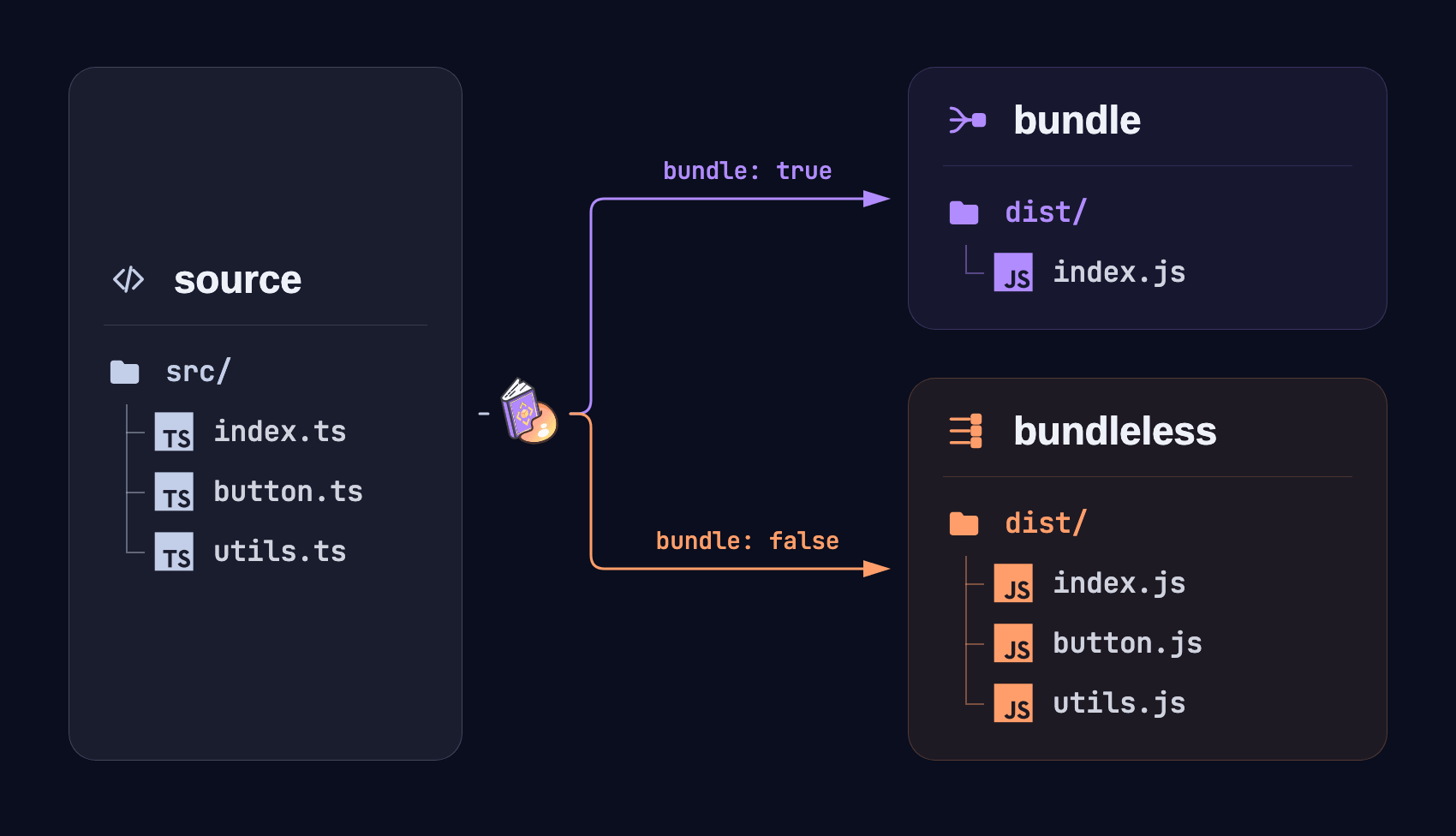
You can choose the appropriate build mode based on how the library is delivered and consumed. When you need to support different consumption scenarios, you can also generate both bundle and bundleless outputs in the same project.
Fast declaration generation
For TypeScript libraries, declaration files affect not only type hints in editors but also whether downstream projects can resolve the library's types correctly. With the dts configuration, Rslib can generate declaration files while building JavaScript output. In bundleless mode, Rslib also handles path aliases and import extensions in declaration files based on the actual output, keeping the declarations aligned with the JavaScript output and compatible with module resolution modes such as NodeNext.
As a project grows, declaration generation can become an increasingly time-consuming part of the build. Rslib provides two ways to speed it up:
- Use TypeScript 7: When a project uses TypeScript 7 or later, Rslib automatically uses native TypeScript (tsgo) to generate declaration files, speeding up declaration generation while retaining type checking.
- Use isolated declarations: Projects that want to reduce build times further can use the experimental isolated declarations mode. During the Rspack build, Rslib quickly generates declaration files for modules in the build dependency graph, further reducing declaration generation overhead.
Note that this mode does not perform type checking, so it is best used with a separate high-performance type-checking process. For example, in a monorepo, regular builds can use Rslib to generate declaration files quickly for each package, while CI or a pre-commit hook runs full type checking centrally through rslint --type-check.
Out-of-the-box multi-framework support
Component libraries are one of Rslib's primary use cases. React, Vue, Svelte, and Solid each have different component files, compilation methods, and runtime conventions. Rslib integrates their compilers through the corresponding Rsbuild plugins. Library build capabilities such as output formats and build modes are configured consistently through Rslib, while plugins and compilers handle framework syntax. This gives component libraries across different frameworks similar configurations and build workflows.
When creating a new project, you can select the corresponding framework template through create-rslib to get the required plugins and base configuration out of the box. Existing projects can register the relevant plugins as needed.
For example, a React component library can register @rsbuild/plugin-react to compile JSX and TSX. Through this plugin, you can also enable the Rust implementation of React Compiler integrated into SWC to automatically optimize component code during the build, without requiring a separate Babel integration:
For component libraries that leave JSX compilation to the application, Rslib can preserve JSX in bundleless mode and emit .jsx files, allowing downstream applications to transform them according to their target environments and build configurations.
See the React guide, Vue guide, Svelte guide, and Solid guide to learn more.
Comprehensive style and asset support
Rslib can process styles, static assets, Web Workers, and Wasm while building JavaScript output, handling references between files according to the output format and build configuration so that the generated output can either be consumed directly or passed to a downstream build tool.
Styles
Rslib supports CSS Modules, PostCSS, style extraction, inlining, minification, and more out of the box, and selects an appropriate style output based on the build mode. Sass, Less, Stylus, and Tailwind CSS can be integrated through Rsbuild plugins.
Static assets
Static assets such as images, fonts, audio, and video can be imported in JavaScript with import or referenced in CSS with url(). Rslib supports importing JSON files as JSON modules with Import Attributes. You can also import local assets with new URL(); Rslib emits the corresponding files and updates references to them in the generated output.
Web Workers and Wasm
Rslib recognizes standard Web Worker syntax and builds Worker entries and their dependencies, without requiring separate entry points or copy scripts. For Wasm, Rslib supports syntax such as WebAssembly ESM Integration and Source Phase Imports. It can generate the code required for loading and instantiation or preserve Wasm imports for downstream build tools or target runtimes that support the corresponding capabilities.
See CSS, Static assets, Web Workers, and Wasm to learn more.
Usage that adapts to your needs
For simple projects, Rslib supports building directly with command-line options, without requiring a configuration file:
As your build requirements grow, you can use a configuration file to gain more control over the build. Rslib 1.0 simplifies the configuration structure: if you only need a single default ESM output, you can omit the lib field and define the configuration directly at the top level. When you need multiple outputs, use the lib array to configure the format and build mode of each output.
Shared settings such as syntax and plugins can be placed at the top level. Each lib entry only needs to specify the settings that differ and can override top-level settings as needed, reducing duplication.
If you need to use Rslib in scripts or other tools, you can create an instance and run a build through the JavaScript API. This is useful for tasks such as building multiple packages in a workspace, wrapping internal build commands, or integrating Rslib into a release pipeline. The JavaScript API works in Node.js, Deno, and Bun:
An integrated library development workflow
Rslib works with tools and plugins across the Rstack ecosystem to support functional testing, documentation development, build analysis, and pre-release checks throughout the library development workflow.
Testing
New projects created with create-rslib are preconfigured with Rstest. With @rstest/adapter-rslib, Rstest can reuse the relevant Rslib configuration, reducing duplicate configuration while making module resolution and source processing during tests more closely match the actual build.
Documentation
Rslib projects can use Rspress to build documentation sites. Component libraries can use @rspress/plugin-preview to write runnable component examples in MDX and @rspress/plugin-api-docgen to generate component API documentation from source code, making it easy to maintain usage guides, component examples, and API references on one site.
Build output checks
Before release, rsbuild-plugin-publint can check for common issues in package.json, package structure, and export configuration, while rsbuild-plugin-arethetypeswrong can check whether declarations work correctly under different module resolution modes. You can choose to enable these checks only in CI:
Build analysis
When you need a deeper analysis of the build process and output, you can use Rsdoctor to inspect build time, dependency relationships, and output size, helping identify problems with build performance, dependency size, and output structure.
See Using Rstest, Using Rspress, and Using Rsdoctor to learn more.
Agent-friendly development experience
As coding agents become more involved in daily development workflows, providing them with accurate tool knowledge and project context becomes increasingly important.
To this end, Rslib provides Agent Skills:
- rslib-best-practices: Provides best practices for configuring and building Rslib projects.
- rslib-modern-package: Provides guidance on designing and publishing modern JavaScript packages.
- migrate-to-rslib: Helps migrate projects built with tsc or tsup to Rslib.
If your coding agent supports Skills, you can install a specific skill in an existing project or install one directly while creating a new project with create-rslib:
In addition to Agent Skills, Rslib provides llms.txt for looking up relevant documentation on demand and llms-full.txt for accessing the complete documentation context. Each documentation page is also available in Markdown, making it easy to provide specific content to an agent.
New projects created with create-rslib also include an AGENTS.md file that lists common commands and relevant documentation links. Developers can extend it with details about the project structure, development workflow, and engineering conventions so agents understand both general Rslib practices and the current project context.
See AI to learn more.
Get started with Rslib 1.0
- If you have not used Rslib before, try it with the StackBlitz example, or follow the Quick start to create a new Rslib project.
- If you are using Rslib 0.x, note that version 1.0 includes some breaking changes. See Upgrading from 0.x to v1 for migration instructions.
- If you plan to migrate from tools such as tsc or tsup to Rslib, see Migrate from existing projects.
What's next
Rslib 1.0 is a stable starting point, not the finish line. Next, we will continue investing in two areas:
- Continue improving build and output capabilities, including optimizing ESM and CJS output, exploring more comprehensive Node.js bundling capabilities and more flexible ways to preserve module structures, and continuing to improve the efficiency and experience of declaration generation and bundling.
- Improve the library development workflow by strengthening the integration of Rslib with testing, documentation, quality checks, and release processes, reducing duplicate configuration and maintenance across different stages.
Acknowledgments
Parts of Rslib's implementation and API design are derived from or inspired by excellent open source projects—including esbuild, mini-css-extract-plugin, tsdown, tsup, and webpack—and we thank these projects and their contributors for the experience, ideas, and implementations they have shared.
Rslib's growth also depends on every contribution from the community, and we thank everyone who has contributed code or documentation, opened issues, joined discussions, or shared feedback—as well as everyone who uses Rslib.
If you encounter any problems or have suggestions while using Rslib, please reach out through GitHub Issues, GitHub Discussions, or our community channels.